Best Smart Locks Without a Subscription
Full smart lock functionality with no monthly fees
Smart locks that do not need a monthly plan for core features, with Alexa, Google or Apple support. What is free and what costs extra.
Some smart locks charge a monthly subscription for features that most people consider basic — activity history, remote access, or even auto-lock. Before buying a smart lock, it's worth understanding which features come free and which ones cost extra.
This guide explains what's typically behind a paywall, which locks give you full functionality with no ongoing fees, and what you're actually giving up if you skip the subscription.
Evidence note: Subscription and pricing information changes over time. Verify current pricing on manufacturer websites before purchasing. This guide reflects publicly available information at time of writing.
What smart lock features typically require a subscription
Subscription models vary by brand. Common features that may require a paid plan:
- Extended activity history — free tiers often limit history to 7 or 30 days; extended history (90+ days) is a paid feature on some platforms
- Remote access — some brands require a bridge hardware purchase (one-time) plus a subscription for cloud connectivity
- Auto-unlock via geofencing — location-based features are sometimes gated behind a premium tier
- Guest access management — more granular access code scheduling (time-limited, one-time codes) sometimes requires a paid plan
- Alerts and notifications — basic unlock alerts are often free; detailed reporting or alert customization may be paid
The good news: for most mainstream smart locks, the core features — remote lock/unlock, basic access codes, basic activity log, and ecosystem integration — are free. Subscriptions typically add convenience or history depth, not essential functionality.
Smart locks with strong no-subscription functionality
Schlage Encode and Encode Plus
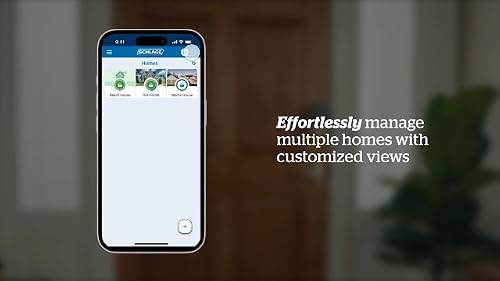
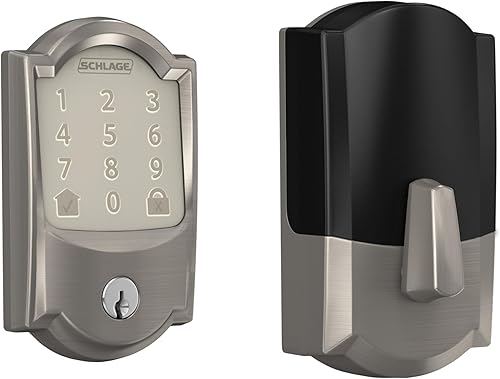
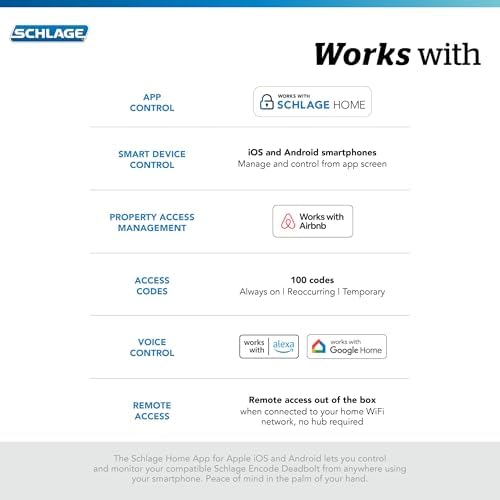
Schlage does not require a subscription for any core feature of the Encode or Encode Plus. Remote access, access code management, activity history, and ecosystem integration (Alexa, Google Home; HomeKit and Matter on the Encode Plus) all work without a monthly fee.
Schlage Home app: free. No paywall for basic use. This is one of the reasons the Encode series is frequently recommended — there are no ongoing costs beyond the purchase price.
Yale Assure Lock 2
Yale does not require a subscription for core Assure Lock 2 features. The Yale Access app is free; access code management, remote access (on Wi-Fi and Matter versions), and activity logs are included. The Yale Access Upgrade plan exists but adds convenience features, not core functionality.
August Wi-Fi Smart Lock (retrofit)
August's subscription model (August Connect plan) has evolved over the years. As of current published documentation, the August app includes remote access and basic activity logs without a subscription on Wi-Fi models. Extended activity history and some geofencing features have historically been premium. Verify the current tier structure on August's website before purchasing, as subscription models change.
Level Lock+
Level does not charge a subscription for core features. App control, access code management, and Apple Home integration work without a recurring fee.
Subscription-heavy models to evaluate carefully
Some smart lock ecosystems have historically tied more features to subscriptions. Research specifically before buying:
- Nuki Smart Lock (popular in Europe, less common in US): Nuki Opener and bridge features have a subscription component in some configurations
- Locks bundled with security system subscriptions (Ring Alarm, SimpliSafe, ADT): The lock may be affordable up front, but meaningful functionality (remote access, monitoring) is often tied to the security system's monthly plan
The pattern to watch for: a very low hardware price paired with a monthly plan requirement for remote access. These are not inherently bad products, but the full cost over time is higher than the purchase price suggests.
Ecosystem integration as a no-subscription alternative
Even if a lock's manufacturer app has a subscription tier, controlling the lock through a major ecosystem (Alexa, Google Home, or Apple Home) often gives you remote access and basic automation without paying the manufacturer's subscription — the ecosystem handles the connectivity.
Example: if a lock works with Alexa, you can lock and unlock it remotely through the Alexa app without a manufacturer subscription, as long as the lock is connected to your Amazon account. This doesn't bypass all subscription features (extended history stays behind the paywall), but it covers the most common use cases for free.
What you're actually giving up without a subscription
For most users, the answer is: not much.
The core smart lock value proposition — keypad entry without a physical key, remote lock/unlock, access codes for guests, and basic alerts — is available without a subscription on the major brands listed above.
What subscriptions typically add:
- Activity history beyond 30 days (useful for rentals or multi-tenant properties, less critical for personal homes)
- More detailed alert customization
- Integration with professional monitoring services (relevant only for security system users)
For a personal residence or small apartment, skipping a subscription is a reasonable choice on most mainstream smart locks.
Frequently asked questions
Do Schlage smart locks require a subscription?
No. The Schlage Encode and Encode Plus work fully — remote access, access codes, activity log, ecosystem integration — without any monthly fee. The Schlage Home app is free.
Does August require a subscription for remote access?
August's subscription structure has changed over the years. Wi-Fi models currently include remote access without a subscription, but some extended features are behind a paid plan. Check August's current pricing page before purchasing, as this has historically been subject to change.
Can I use a smart lock with Alexa without paying for the manufacturer's subscription?
For most locks: yes. If a lock is integrated with Alexa, remote locking and unlocking through the Alexa app works using Amazon's infrastructure, regardless of whether you pay the lock manufacturer's subscription. You may lose access to some manufacturer-specific features (detailed history, for example) but retain basic remote control.
What about Ring smart locks?
Ring locks are designed to work within the Ring ecosystem, which is subscription-driven. The Ring Protect plan unlocks features that many users consider essential. If you're already paying for Ring Protect for a doorbell or camera, the smart lock may add value without an additional charge — but if you're starting fresh, factor the subscription cost into the total price.
Is a subscription ever worth it for a smart lock?
For residential use: rarely. For rental properties: extended activity history (who entered and when, over months) and granular guest access scheduling have clear value if you're managing access for multiple people. In that specific use case, a subscription that provides detailed logs and one-time access codes may be worth the monthly cost.
Where to Buy






Affiliate links — we may earn a commission at no extra cost to you.
Related Articles
More in this topic
- COMPARISON Schlage Encode vs Encode Plus: What's the Difference?
- Smart Locks with Apple Home Key: Which Ones Support It?
- Best Smart Locks: Top Picks for Every Home
- EXPLAINER How Smart Locks Work: The Complete Explainer
- HOW TO How to Choose a Smart Lock: The Complete Buying Guide
- PRODUCT REVIEW Schlage Encode Plus Review: The Best Smart Lock for Apple HomeKit Users?
- COMPARISON August vs Schlage Smart Lock: Which Is Right for Your Home?
- Best Smart Locks for Renters: Keep Your Keys, No Drilling
- Best Smart Locks for Apple Home (HomeKit & Matter)